Online Photometric Calibration of Automatic Gain Thermal Infrared Cameras
Details on our RAL-2021 paper
Link to source code: thermal_photometric_calibration
The readme file provided in this link contains the instructions on how to build and run our code on a demo dataset. This article mainly focuses on the following questions:
- The algorithm: How it works and what should you expect?
- The C++ implementation: Where and how is the algorithm implemented in the code?
- How can you use it in your project or dataset?
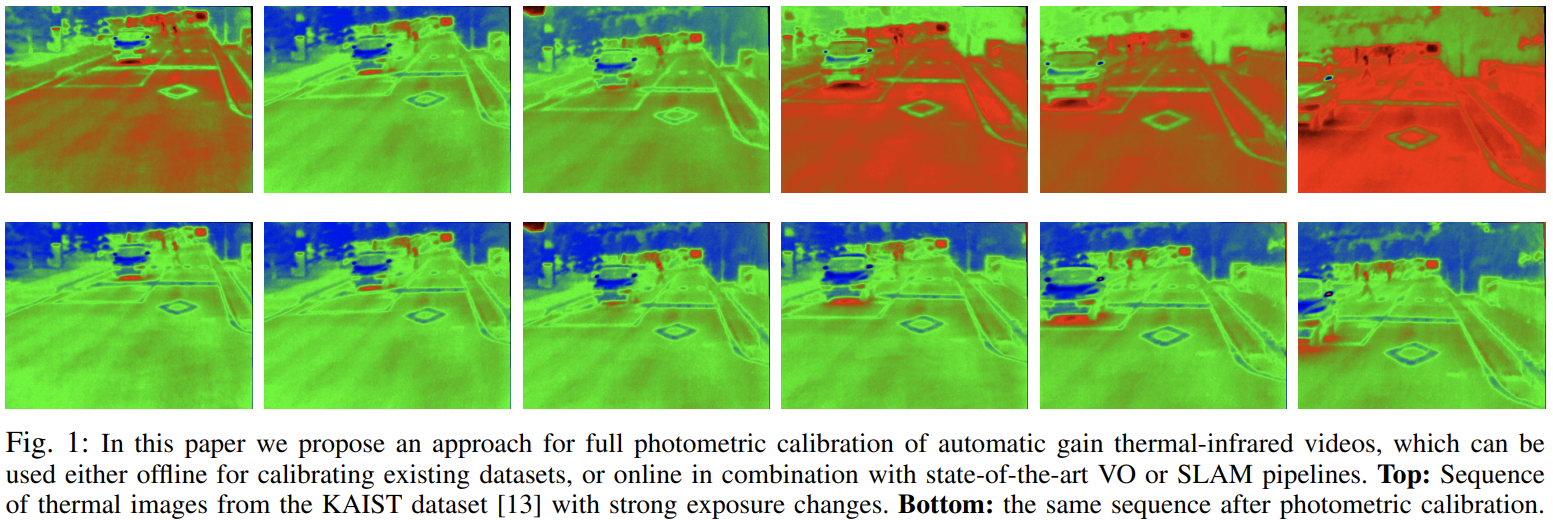
1. The algorithm
First, if you are not familiar with this work, I would refer you to our presentation video which briefly explains our paper. It gives a gentle introduction of the problem and why it is important.
By now if you have decided to use our algorithm you might fall into one of the following two cases:
- You have a thermal camera video dataset and you want to generate a calibrated version of the dataset. Since, in this case there is no requirement for real-time processing, we can consider it an offline process.
- You have a computer vision pipeline which takes live feed from a thermal camera and you want to ensure that the live feed that you provide is photometrically calibrated. This mode of operation has strict real-time performance requirements and thus we can consider it an online process.
Regardless of your mode of operation, our algorithm is primarily designed for the more interesting online mode of operation, which can also be used without any modification in case you are only interested in the offline use case. So let us illustrate the online use case:
Thermal camera images from a source (live camera or a dataset) are arriving as a stream of images which are labelled as $\ldots, I_{t-5}, I_{t-4}, I_{t-3}, I_{t-2}, I_{t-1}, I_{t}$ where $I_t$ refers to the most recent frame. Between these incoming images, our algorithm requires pixel correspondences. We know that finding these pixel correspondences is hard given that the images have photometric errors, however the assumption is that we can still find a few reliable correspondences between not only one pair of images ({$I_t, I_{t-1}$}) but other pairs ({$I_t, I_{t-i}$},{$I_t, I_{t-j}$},{$I_t, I_{t-k}$}). So for frame $I_t$ few correspondences each from a bunch of previous frames can allow the algorithm to remove the photometric errors in that frame, which in turn will allow now more stronger correspondences for any down-stream computer vision pipeline.
Goal: Find out the temporal parameters $P_t$ and spatial parameters $\mathcal{P}_s$ which can be used to used to correct the thermal camera images so that they have less of the photometric errors.
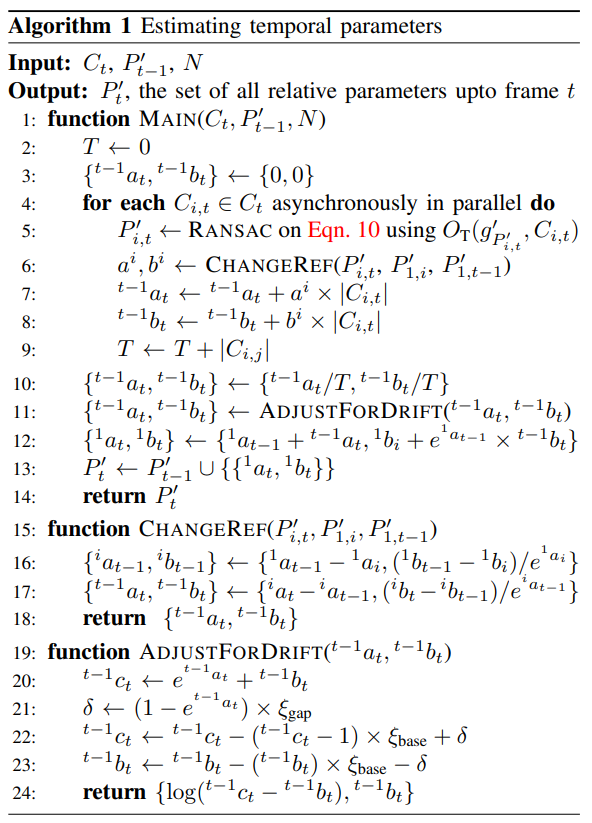
So in this online setup, our algorithm for any current frame $I_t$ requires only the correspondences $C_t$ from any number $N>1$ of previous frames and the temporal parameters $P_{t-1}$ that have been estimated for the previous frames up to frame $I_{t-1}$. The algorihtm below will then take these correspondences and process each pair of current and previous frame in parallel to estimate the relative temporal parameters $P_{i,t}$. Correspondences from each previous pair help the algorithm to find the Maximum Likelihood Estimate for the temporal parameters. In the following sections you will see how we optimize the implementation to perform this process very efficiently as this process needs to be performed every frame. In our experiments, this step took around on average 10 milli seconds per frame on an Intel Core i7-4710HQ CPU @ 2.50GHz.
2. The implementation
All of the code required for photometric calibration is provided in the file irPhotoCalib.cpp and a demo on how to call these function is provided in main.cpp.
The $\texttt{Main}$ function in shown in the algorithm above is implemented in the IRPhotoCalib::ProcessCurrentFrame function.
3. How to use it in your project?
In term of use case, the only thing you need to worry about is to instantiate the class IRPhotoCalib (which requires no parameters) and call IRPhotoCalib::ProcessCurrentFrame function for every frame with the pixel correspondences of this frame with previous frames. The following are details on each input that goes into this function:
vector<vector<float> > intensity_history:vector<vector<float> > intensity_current:vector<int> frame_ids_history:vector<vector<pair<int,int> > > pixels_history:vector<vector<pair<int,int> > > pixels_current:bool thisKF